How to Choose a Wedding Hashtag Guests Can Use
Choose and check a wedding hashtag, protect guest privacy and share it on invitations. Learn what a hashtag and a QR code can do.
A wedding hashtag is a short label guests can add to posts on a social platform. It can help people find public posts that use the same label, but it is not a private photo album, does not reserve a name and cannot collect every guest's pictures. Start by deciding whether you want people to post at all; a celebration can be shared privately, too.
If you do want a hashtag, make it easy to read aloud, type and check. This guide walks through a short list, a search on the platforms your guests use, and a way to share the final choice without promising that it is unique.
Start with the names you actually use
Write down the two first names you want guests to recognize. You can also consider a shared family name, initials or the year of the wedding. A shared surname is optional: don't choose one simply because a template assumes you will change your names.
For a fictional couple named Maya and Owen, a simple starting idea might be #MayaAndOwen2027. A shorter option could use their initials or first names. These are examples of patterns, not claims that any label is available. Replace the names and date with your own, and read the result as if you had never seen it before.
If a name has a common short form, try both the full name and the version friends actually use. Avoid placing letters together in a way that can be read as a different word. A friend who hasn't helped create the hashtag is useful here: ask them what they see before explaining it.
Decide on a tone
A straightforward name-and-year label works well if you want guests to remember it quickly. A romantic phrase can suit a more personal caption; a joke might be a better fit for a group that already knows the reference. A short hashtag is easier to type, but a very common combination may overlap with someone else's posts.
Puns are optional. If the joke needs a long explanation, or changes someone's name in a way they dislike, it may not be worth using. Both partners should be comfortable with the wording and with how the result looks in a public post.
Make a small list with the generator
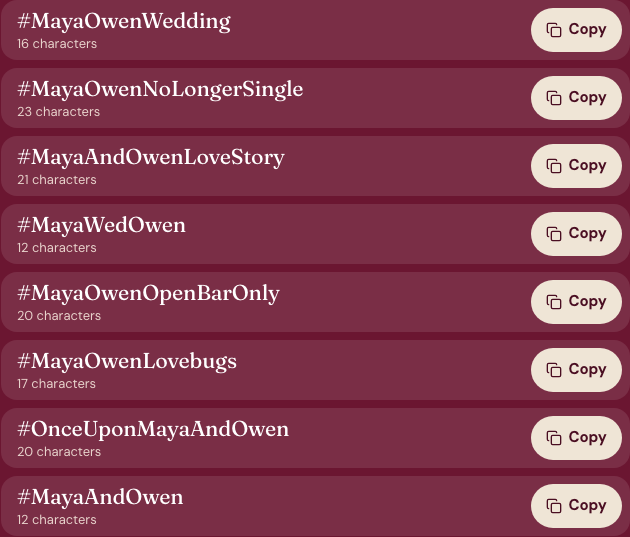
The wedding hashtag generator combines name-based patterns in your browser. It is a free template tool, not an AI writer; the names entered into this tool stay in your browser. Add two first names, and optionally a shared last name and a wedding date. The date supplies the year for patterns that use it. You can instead choose the last-name-only option when you provide a family name.
Choose one or more styles, or leave the styles unselected for a mix. The tool shows eight ideas at a time; you can copy one, copy a set or generate more. It caps each result at 30 characters including the #. It uses letters and numbers, simplifies accents and leaves out characters from non-Latin scripts, so check whether the spelling still represents your names as you intend.
The templates are finite and can repeat. They do not check social networks, reserve a label or invent a custom pun from the meaning of a surname. Treat the list as a starting point and edit a candidate yourself if that makes it clearer.
Search each candidate before you print it
Search the exact spelling on each platform where you expect guests to use it. Look for unrelated events, public posts that could be confusing, a meaning you didn't notice and alternate spellings. Try reading the letters without capitalization as well: people may type them in lower case.
Capitalizing the first letter of each word, often called CamelCase, can make the phrase easier to read: #MayaAndOwen2027 is clearer than a long unbroken lower-case string. It does not make the label private or unique. Search results and platform behavior can change, so recheck shortly before you order signs or cards.
Pick two or three finalists rather than searching dozens. If every obvious option is already widely used, add a detail both of you are happy to share, or choose a different phrase. Avoid adding a full date or location merely to make the label distinctive if you don't want those details public.
Give guests a clear, optional instruction
Once you choose, put the same spelling in one or two places guests will notice: a small sign near the guest book, a wedding website you already manage, or a message sent with a digital card. A short instruction is enough: “If you share a photo publicly, you can use #MayaAndOwen2027.” Change the sample to your own label.
Ask guests to respect anyone who does not want their picture posted. A hashtag does not change a person's account settings or let you see private posts you otherwise couldn't see. If you would rather gather photos privately, use a photo-sharing service you control and explain its access settings to guests.
Add the idea to a card or a QR sign
You can add a checked hashtag to the text of a wedding invitation or a save-the-date card. Preview the layout and download the finished image, then open that saved file to check the spelling. The card maker does not send it for you.
If you already have an album or RSVP link, the wedding QR code tool can turn that link into a code. It does not create the album, receive uploads or collect replies. Test the downloaded code with another device and check the destination's sharing permissions before printing it. A hashtag and a QR code solve different problems; you can use either, both or neither.
For an optional AI illustration on a photo card, see the separate AI wedding photo generator. It needs one existing photo of two consenting adults, and generated faces or details may change. Review pricing before using extra credits, and label an AI-generated image when sharing it.
A final check
Read the chosen label aloud, type it on a phone, search it on the relevant platforms and ask both partners to approve it. Keep the instruction optional for guests. The generator can help you make a short list, while your own review decides which one fits.
These product notes were prepared with AI assistance and checked against the tool on 28 October 2026. The example names are fictional. See About or contact the team if the controls change.